
In a recent LinkedIn post, I mentioned that GPT-6 Astra is one of those models that represents such a leap that it allows all of us to jointly explore its capabilities.
This article is about exactly such a capability. I used to craft a lot of architecture diagrams. They are a great, lossy way to capture and convey one aspect of a system. I have always used draw.io for this purpose. With the popularity of large language models, Mermaid grew in popularity, but I always felt like it wasn’t the same as having a carefully crafted architecture diagram built in draw.io.
I regularly tried to revive my love for draw.io. After all, draw.io diagrams are just XML. GPT-5.6 Sol actually wasn’t that bad. Here is a sample diagram (in this article, I am going to use AI Engineer Coach, an OSS project of mine):
The content is there, but visually, the diagram isn’t finished. It gives you something to work with, which is useful. But there’s still a lot of work between “the model drew the architecture” and “this looks beautiful.”
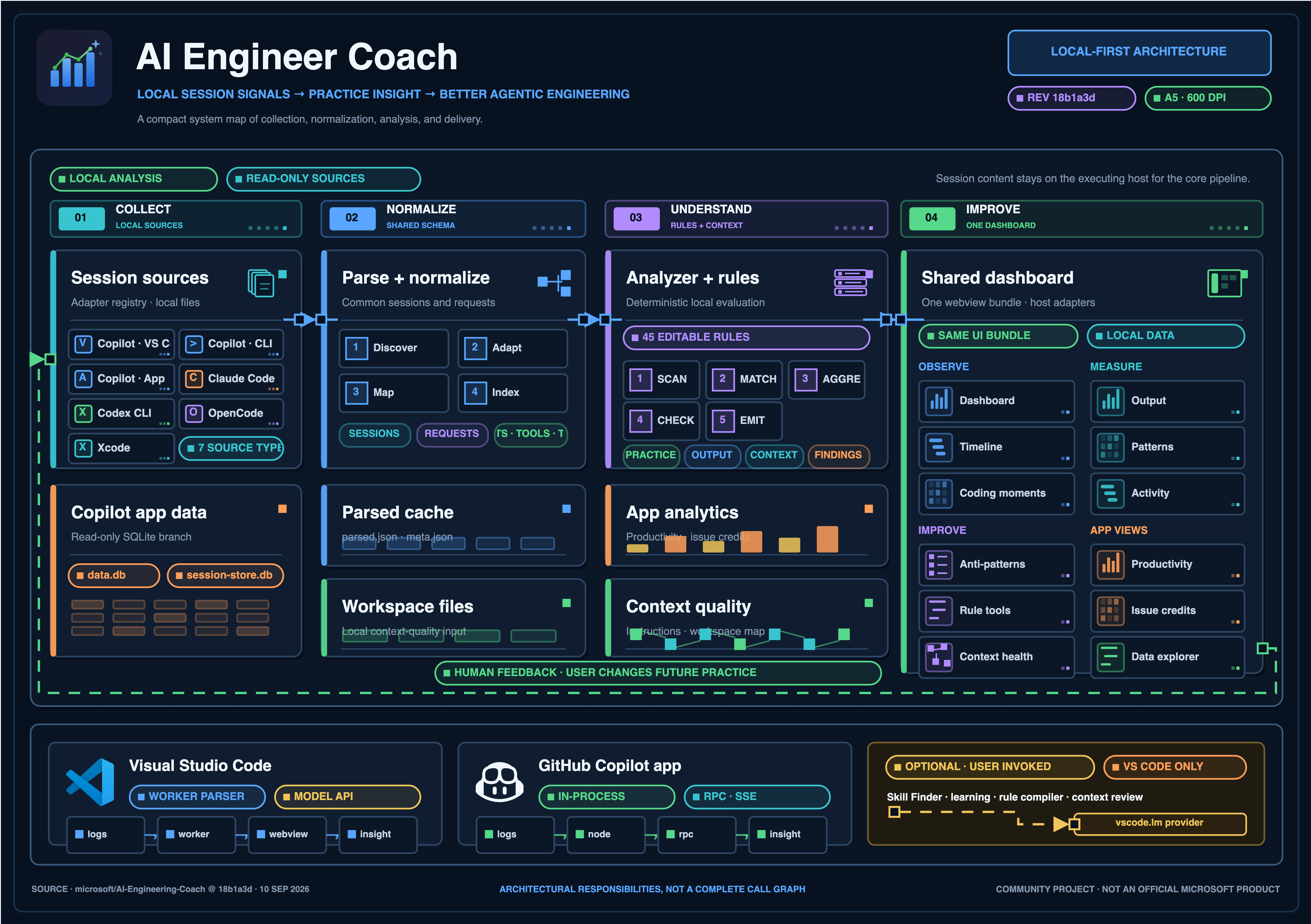
Here is the same diagram, but this time using GPT-6 Astra 😦🤯:

This is not only very detailed, it’s also visually perfect. You couldn’t tell whether this came from an image model such as gpt-image-2.5 or whether it was a draw.io diagram built from fully editable vector graphics.
You can now create these kinds of diagrams from a single request, but the model still needs guidance and several rounds of refinement. What worked for me was building two kinds of skills: one skill that is responsible for researching the ground truth relevant to the architecture diagram, as well as the visual language it should follow, and then another skill that the model should use to iterate and improve. First drafts often have artefacts, bad arrow connections, etc., but if you allow the model to export the visualisation as a PNG and look at it, it can hill-climb its way to a great result.
The drawio-pitch skill starts by launching two or three GPT-6 Astra research agents, each investigating a different part of the subject. It combines their findings into sourced facts and relationships. It also studies visual references, brand resources, and existing logos before choosing a visual direction. From this research, the model creates an editable .drawio file that fits one A5 sheet, exports it as a PNG, and inspects the actual image.
The drawio-iterate skill then requires at least four review passes after the initial pitch. The first pass is a visual upgrade with a trick: asking the model to increase the diagram code by at least 800%. Since the image will not get any bigger, that increase must land in the form of visual detail, relevant logos and richer composition. The diagram must still fit on one A5 sheet with readable labels. In my experiments, this constraint pushed the model beyond basic boxes and arrows.
The next three passes allow corrections only: incorrect orientations, overlapping elements, and wrong arrows, including their direction, endpoints, and routing. The model inspects the current PNG, edits the matching .drawio source, then exports and inspects a new PNG at A5 print size and in enlarged detail. Each pass saves its own .drawio and PNG pair with a short change record. In the final required pass, the model traces every arrow from source to target. If defects remain, it continues with correction-only passes. The model uses the rendered image as feedback, but makes each correction in the editable diagram source.
If you want to start drawing your own architecture diagrams using these techniques, you can find both skills in my GitHub repo: https://github.com/aymenfurter/skills
Make sure to install both drawio-pitch and drawio-iterate.
Ah, and by the way, if you use the GitHub Copilot app, I recommend the following canvas extension by Christopher Schleiden to view the output: https://github.com/cschleiden/canvas-drawio
