Recently, Anthropic released their new flagship model, Opus 4.5. The holiday season provided a quiet window to really experiment with it, and after putting it through its paces, it is becoming clear that this model isn’t just an incremental upgrade. It is fundamentally changing how we use AI to ship software.
Before Opus 4.5, my personal workflow was heavily centered on the mid-sized Sonnet model. I had little reason to switch to the full-size legacy Opus. I treated the larger model as a specialized tool for specific scenarios, usually when I hit a bug or a roadblock that the faster, lighter model couldn’t resolve. It was a troubleshooting device, not a primary author.
With Opus 4.5, that dynamic has inverted. The capability gap between Sonnet 4.5 and Opus 4.5 represents a different tier of reasoning. I now see myself, and many of my colleagues, using Opus not just to fix code, but to write it.
However, Opus 4.5 is still a Large Language Model (LLM). It has flaws, it has costs, and it requires a specific approach to yield the best results. Here are the best practices I have adopted to integrate this model into my workflow.
Enablement and Access
First, the logistics. Previously, accessing top-tier models like Opus 4.1 often required a dedicated GitHub Copilot Enterprise license. Fortunately, access has been broadened for this release. Opus 4.5 is currently Generally Available for GitHub Copilot Business, Enterprise, and Pro users.
Additionally, for those building their own custom agentic workflows outside of Copilot, Opus 4.5 is also available directly via Microsoft Foundry.
To use it in GitHub Copilot, your organization’s administrator must explicitly enable the policy in the configuration settings.
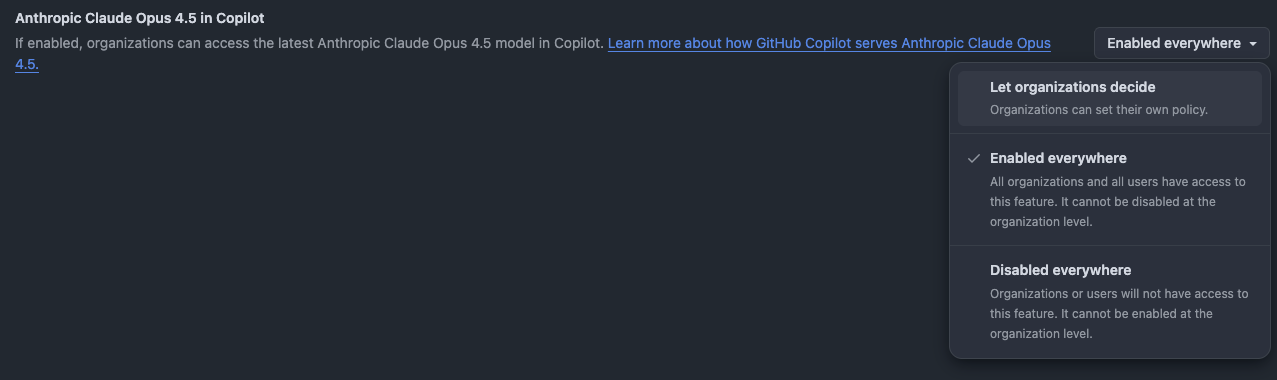
Once opted in, the model becomes available in the model picker. But just because you can use it for everything, doesn’t mean you should.
Strategic Model Selection
Opus 4.5 is expensive. In the context of GitHub Copilot, it consumes three premium requests per interaction, compared to the single request typically used by Sonnet. This necessitates a more mindful approach to model selection.
One of the greatest value propositions of GitHub Copilot today is the model picker. It allows you to fit the tool to the task.
- For routine tasks: If you are fixing a small bug, generating boilerplate, or asking a simple syntax question, switch to Gemini 3 Flash or GPT-5 mini. It is faster and more economical.
- For deep work: If you are writing a complex document, architecting a new module, or implementing a large chunk of logic, switch to Opus 4.5. The difference in output quality justifies the cost.
Context Engineering and Teaching
Because Opus consumes premium requests regardless of prompt length, you want to make every request count. Sending a single sentence is a waste of resources. To be cost-efficient and effective, you must curate your prompt and its context.
Instead of writing complex instructions directly in the chat, draft them in a dedicated markdown file. You can then use GitHub Copilot’s #file command to reference this prompt file, along with any other relevant documentation or codebase context.
A powerful technique is to teach the AI based on previous examples. As you build software, you accumulate a library of polished, working code. When asking Opus to spin up a new feature, include references to those past coding activities. This grounds the model in your specific architectural style and coding standards, significantly reducing the need for rework.
The Specification Driven Workflow
Opus 4.5 excels at handling detail, but it requires precision. A vague prompt like “Write a portfolio website” will yield generic results.
Don’t shy away from spending 5 to 10 minutes crafting a high-quality specification. Write down your requirements in a dedicated spec file. Detail the constraints, the desired libraries, and the functional goals.
The Multi-Model Review Pattern
Language models have an inherent bias: they tend to prefer their own output.
To counter this, I use a “Reviewer” pattern.
- Draft: Use Opus 4.5 to implement the code based on the spec.
- Review: Use a different model family—such as GPT-5 or Gemini—to review the implementation against the original spec file. Ask it specifically to identify gaps or logic errors.
- Refine: Take the task list generated by the reviewer and feed it back to Opus 4.5 to apply the fixes.
Leveraging Cloud Agents
For significant chunks of work, the interaction model of a “chat” can be limiting. This is where the Coding Agent becomes essential.
In VS Code, you can switch from the local agent to the Cloud Agent. This changes the paradigm from short-lived command-response loops to long-running, asynchronous tasks. You define an issue or a detailed specification, and the agent works on it—sometimes for 20 or 25 minutes.
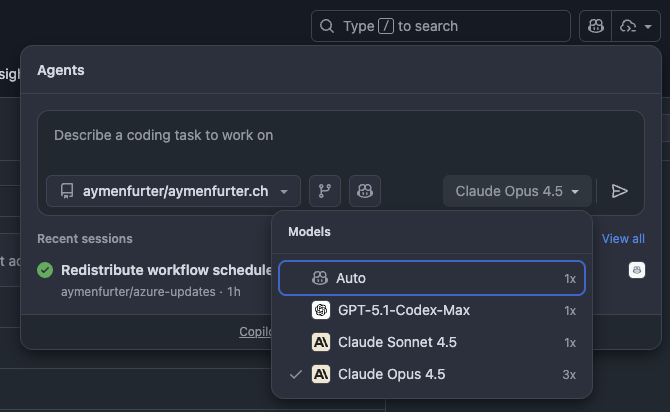
The economic advantage here is substantial. While you still pay the premium requests (e.g., 3 requests for Opus), the agent performs a massive amount of work within that “session” relative to the cost. It is reasonable to assume that this pricing model could evolve as the feature matures.
Summary
The release of Opus 4.5 signals a shift from AI as a debugger to AI as a builder. To get the most out of it without burning through your request limits:
- Switch models: Use lighter models for triage, Opus for heavy lifting.
- Engineer the Context: Teach the model with your own codebase.
- Specify heavily: Write specs, not just prompts.
- Use Cloud Agents: For complex tasks, let the agent run asynchronously.
We have crossed a threshold in capability. The challenge now is adapting our engineering habits to wield it effectively.
References
- GitHub Changelog: Claude Opus 4.5 is now generally available in GitHub Copilot
- Azure Blog: Introducing Claude Opus 4.5 in Microsoft Foundry
