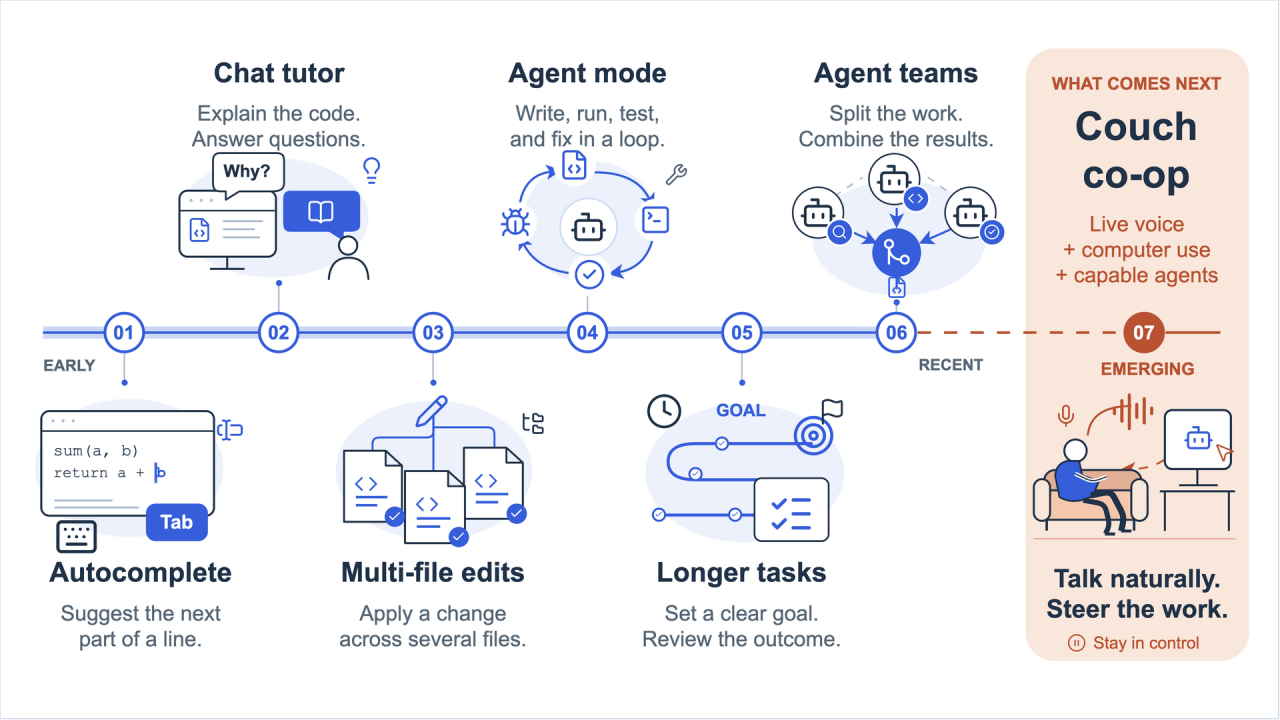
Coding agents are constantly evolving. I counted six different stages so far.
- Initially we had models that were only able to do autocompletion. These were already super useful, as you were able to tab your way through your code, but AI was mostly a small helper for completing the current line of code.
- Then we had the first chat experiences. Limited by the models of the time, both in intelligence and context size, those were useful tutors. They could contextualize their world knowledge with the current file and give you guidance and information, sometimes hallucinated.
- Next, Copilot learned how to modify the files themselves directly, and finally to work even across multiple files.
- And then in October / November last year, agent mode got really, really good. Models could now write, run, debug and analyse code autonomously, and even work on tasks that take minutes.
- Recently we saw another shift: agents could work on longer and longer tasks autonomously (if the task is well defined and ideally has a clear goal). This means for some tasks we can stop looking at the code and focus on outcomes.
- In the last few months we saw that cross-agent collaboration got much, much better (especially with Astra). Multiple coding agents / sessions can now collaborate more effectively.
Now, with the convergence of improved computer-use capabilities of models, new realtime models (gpt-live-1 by OpenAI) and more powerful foundation models, a new type of interaction is on the brink of feasibility: the “couch co-op” phase of coding.
Couch Co-Op for you and your agent
Coding has become much more natural. You can specify in natural language what you want, and your agents build it. Since agents learned to work on bigger tasks, the bottleneck becomes what you can specify in your own voice.
Many of us use speech-to-text software to record ourselves and use this as context for LLMs, but we are still glued to our computers. This is becoming a bottleneck. It’s both a computer bottleneck (you only have one computer to use) and a personal energy bottleneck (spending time in front of a computer typing, or even speaking, feels much more exhausting than having a conversation in your living room).
Couch co-op for agents can change this. We are often already talking to the computer anyway, and more recent models got better and better at computer use. So why not drop the keyboard and mouse too? And since we are at it, why not even drop the dedicated graphical user interface with the chat?
Meet Thursday
This is the form factor I wanted to explore. That’s why I decided to build Thursday, a prototype of an agent that uses gpt-live-1 as a bidirectional voice model (you can communicate with it like you would with a human).
Thursday is a prototype, so it is still rough around the edges. The voice model sometimes says “switching now” without actually handing the work over, clicks occasionally miss, and talking over the assistant can confuse it.
Below you can find a demo video of Thursday in action:
How it works
In the background, the work you ask gpt-live-1 to do is actually driven by the GitHub Copilot coding agent in a cascading way. The first entry point is a “quick session” powered by the gpt-5.6-luna model. This session is used to perform quick, targeted actions we don’t want the user to have to wait for, like opening a tab or switching a window. In addition, there is also a deep session powered by Astra for longer tasks, which the quick session hands work over to.
Both sessions feed back to the live model: the quick session its results, the deep session any activity as it happens. The whole orchestra is turned “natural” by prompting the live model to “act” as if it were doing the work behind the incoming events itself.
Thursday is Rust-based, and we are using the Copilot SDK for interacting with the Copilot CLI. The sessions have access to both native tools to read and write files and run commands, as well as computer-use functions (via Peekaboo MCP).
Here is how it all fits together:
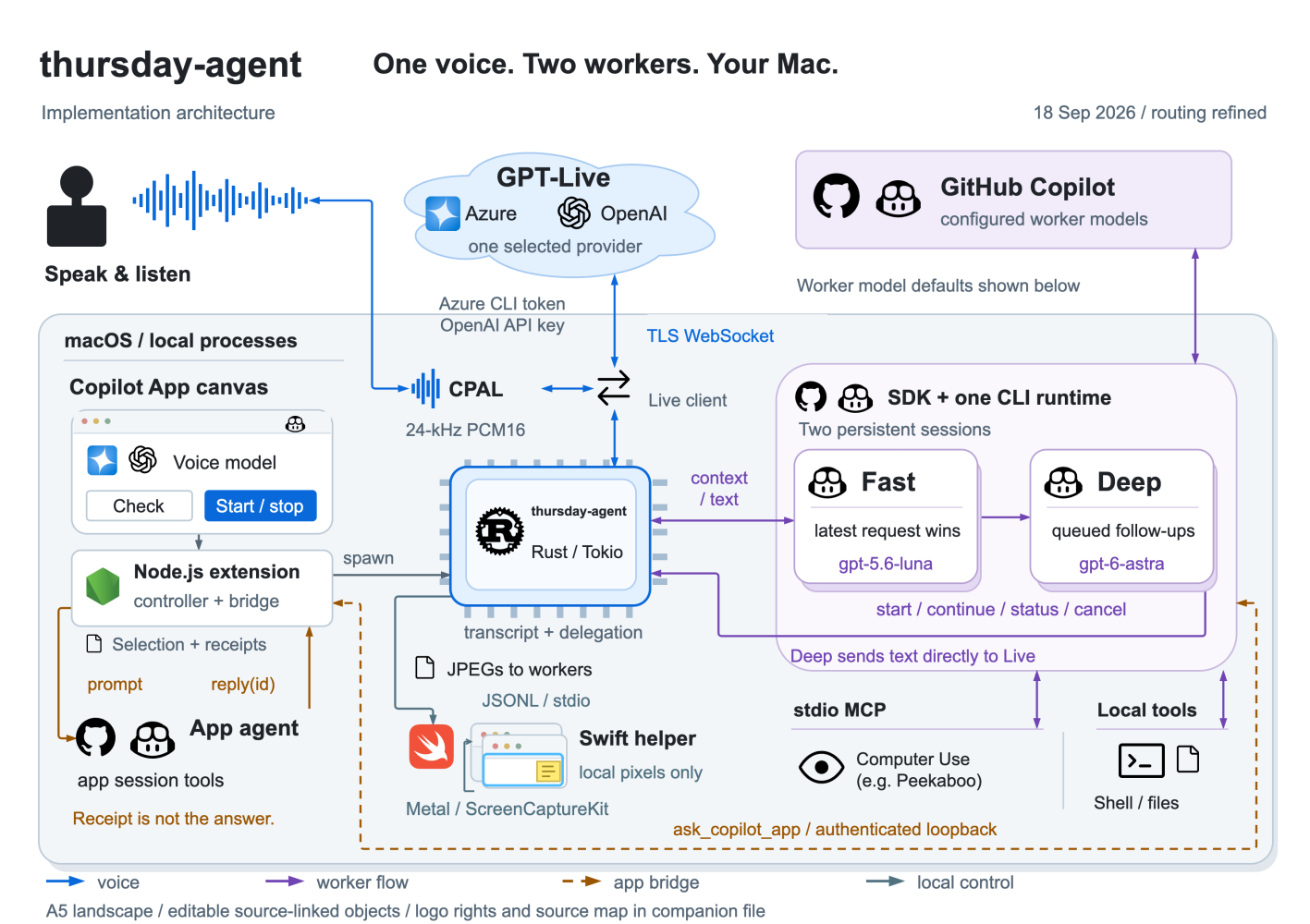
Additionally, we have a visualization written in Swift / Metal shaders to show which application the AI is currently working on. A small helper app draws a transparent overlay directly behind the window the agent is touching, so the window appears to glow from behind. The shader takes the colors of the window’s border from a live screen capture, extends them outward as rays of light, and lets them pulse with the syllables of the voice.
Keeping it snappy
One learning I had was that for the quick session to feel snappy and responsive, I needed to reduce the number of tools to the minimum. That’s why the quick session only has access to:
- six built-in Copilot tools (bash, view, edit, create, grep, glob)
- Computer-use tools, powered by peekaboo (see, click, type, press, scroll, app, window, menu, dialog)
- a handful of Thursday’s own tools: run a command, show a file, highlight or focus a window, look at the screen, say something to the user, ask the Copilot app, and start, check, continue or cancel a deep task
It also uses Luna instead of a more powerful model. I figured it’s better to get it wrong sometimes than to have the experience be slow and unresponsive.
Compared to the quick session, the deep session has access to Copilot’s full default toolset, the complete Computer Use MCP server, the same Thursday tools, and three sub-agents: a researcher, a coder, and an operator that drives Mac apps.
The gpt-live-1 session has no tools at all. The only thing it can do besides talking is signal that something needs work. Thursday then sends the recent transcript and a screenshot to the quick session, and everything the voice knows about the work comes from notes Thursday appends to its context.
From the Keyboard to the Couch
What this comes down to is a new way we can interact with coding agents. We can use our computer hands-free, and we can ask the AI to control the computer for us as well as to write code. In principle it could even interact with any MCP server we like, although right now Thursday deliberately switches off every MCP server except the computer-use one to stay fast.
If you want to try it yourself: Thursday requires both a Copilot subscription for the SDK invocations and a gpt-live-1 model (either via Azure or directly via OpenAI). It is available on GitHub: https://github.com/aymenfurter/thursday-agent
